
Power surges can happen unexpectedly, causing significant damage to your home’s electrical system and appliances. Whether caused by lightning strikes, faulty wiring, or utility company issues, a power surge can leave you with costly repairs if not addressed promptly.
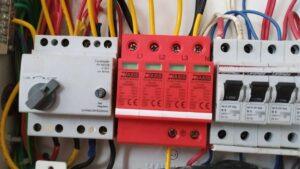
To help you protect your home, we’ve created a detailed post-power surge inspection checklist. Follow these steps to ensure your electrical system is safe and functioning properly.
Why Power Surges Are Dangerous
A power surge is a sudden spike in voltage that can overwhelm your home’s electrical system. Even minor surges can degrade wiring and electronics over time, while major surges can cause immediate damage, including:
- Fried circuits in appliances and devices
- Melted wiring leading to fire hazards
- Tripped breakers or blown fuses
- Data loss in computers and smart devices
If you suspect a power surge has affected your home, inspect these key areas immediately.
1. Check Your Electrical Panel
Your circuit breaker panel is the first line of defense against power surges. After a surge, follow these steps:
- Look for tripped breakers – Reset any that have switched to the “OFF” position.
- Inspect for burn marks or melted components – If you see damage, call a licensed electrician immediately.
- Test GFCI outlets – Press the “TEST” and “RESET” buttons to ensure they’re working.
⚠️ Warning: If your breaker keeps tripping, there may be a deeper electrical issue. Contact RW Electrician Pensacola at 850-649-1500 for professional assistance.
2. Inspect Appliances and Electronics
Power surges often damage sensitive electronics. Check these devices:
Large Appliances
- Refrigerator – Listen for unusual noises; check if it’s cooling properly.
- HVAC System – Test heating and cooling functions.
- Washer & Dryer – Run a short cycle to ensure they’re working.
Small Electronics
- Computers & TVs – Look for flickering screens or failure to power on.
- Modems & Routers – Check for internet connectivity issues.
- Smart Home Devices – Test voice commands and connectivity.
🔌 Tip: Unplug devices during storms to prevent surge damage. Consider installing surge protectors for added safety.
3. Examine Outlets and Switches
Faulty wiring can worsen after a power surge. Inspect:
- Discolored or warm outlets – Indicates potential overheating.
- Burning smells – A sign of electrical fire risk.
- Sparks or buzzing sounds – Immediate danger; shut off power and call an electrician.
If you find damage, avoid using the outlet until a professional inspects it.
4. Test Smoke and Carbon Monoxide Detectors
Power surges can disrupt safety devices. Ensure:
- Detectors have power (check batteries and wiring).
- Test alarms by pressing the “TEST” button.
🚨 Safety First: Replace detectors older than 10 years.
5. Look for Hidden Wiring Damage
Some surge damage isn’t visible. Watch for:
- Flickering lights – Could indicate wiring issues.
- Intermittent power loss – A sign of damaged circuits.
- Buzzing from walls – Suggests arcing wires (fire hazard).
If you notice these signs, schedule an electrical inspection.
6. Consider Installing Surge Protection
Prevent future damage with:
- Whole-Home Surge Protectors – Installed at your electrical panel.
- Outlet Surge Protectors – For computers and entertainment systems.
- UPS (Uninterruptible Power Supply) – Protects electronics during outages.
🔧 Professional Help: For surge protector installation, call RW Electrician Pensacola at 850-649-1500.
Final Thoughts
Power surges pose serious risks to your home’s electrical system. By following this checklist, you can identify damage early and prevent hazards. If you’re unsure about any electrical issues, always consult a licensed electrician.
🚀 Need Help? Contact RW Electrician Pensacola at 850-649-1500 for expert surge damage inspections and repairs!